After completing this unit, you will able to:
1. What is sharing setting?
2. How to define sharing setting in Salesforce?
3. The specific options available in sharing settings can vary depending on the platform, but they generally include options like:
4. What are the advatanages for sharing setting?
5. Sharing settings can include various parameters such as:
What is sharing setting?
Sharing settings typically refer to the configurable options that control how information or resources are shared within a digital platform, application, or system. These settings determine who can access, view, modify, or interact with specific content, data, or functionalities.
How to define sharing setting in Salesforce?
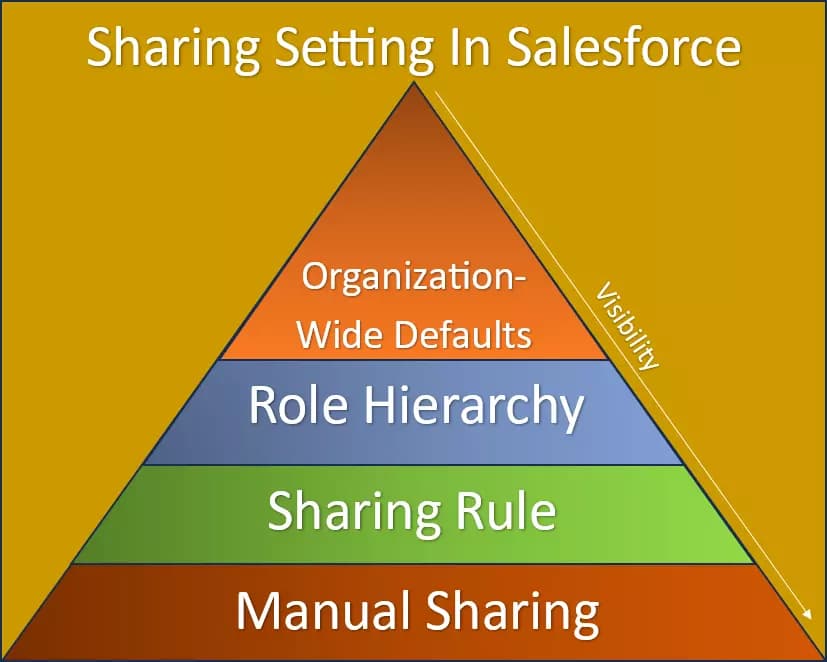
In Salesforce, sharing settings are defined to control access to records. Here's a concise overview of how to define sharing settings:
1. Organization-Wide Defaults: Set the default access level for records, such as Private, Public Read Only, Public Read/Write, or Public Read/Write/Transfer.
2. Role Hierarchy: Utilize the organization's role hierarchy to grant access to records owned by users lower in the hierarchy to users higher in the hierarchy.
3. Sharing Rules: Create rules to extend access based on criteria, allowing users in specific roles or groups to access certain records.
4. Manual Sharing: Record owners and higher-level users can manually share individual records with specific users or groups.
5. Permission Sets: Assign permission sets to users to grant additional access beyond their profiles.
6. Profiles and Permission Levels: Define profiles that determine users' access to records, with permission levels controlling the extent of that access.
7. Field-Level Security: Control which fields within records users can access, read, edit, or view.
8. Record Types: Set up record types to manage access based on different types of records.
9. Managed Sharing: Allow managed packages to control sharing settings for custom objects included in the package.
10. Consider Business Needs: Tailor these settings to align with the organization's data requirements, security concerns, and collaboration goals.
Effectively managing sharing settings ensures data security, privacy, and appropriate access for users while supporting seamless collaboration within the Salesforce environment.
The specific options available in sharing settings can vary depending on the platform, but they generally include options like:
1. Privacy Settings: These settings control who can see your content. You might be able to choose between options like "Public," "Friends Only," "Private," or customize your audience.
2. Permission Levels: For collaborative platforms, you can define different permission levels for users. For instance, you might have settings like "View Only," "Edit," "Comment," or "Full Access."
3. Link Sharing: Some platforms allow you to generate links to share content. You can often choose whether the link is accessible by anyone with the link, specific people, or only you.
4. Group or Circle Sharing: On platforms that support groups or circles, you can control which groups of people have access to your content.
5. Folder or File Sharing: In cloud storage services, you can set sharing settings for individual files or folders, specifying who can access them and in what capacity.
6. Time-Limited Sharing: You might be able to set an expiration date for shared content, after which it becomes inaccessible.
7. Embedding and External Sharing: Some platforms allow you to embed content on other websites or share it externally. Sharing settings control whether this is allowed and who can access the content.
8. Notifications and Alerts: You can often configure notifications to alert you when someone interacts with your shared content.
Free newsletter
Get Salesforce insights delivered weekly
Join 500+ Salesforce professionals and stay ahead of the curve.
No spam. Unsubscribe any time.
9. Location-based Sharing: Some applications allow you to share content based on your physical location or the location of the recipient.
10.Public vs. Private Profiles: On social media platforms, you might have the choice to make your profile and posts public (visible to anyone) or private (only visible to approved followers).
What are the advatanages for sharing setting?
Sharing settings in Salesforce play a pivotal role in determining how data is accessed, viewed, and modified within the platform.
Sharing settings in Salesforce offer several advantages:
1. Data Security: Sharing settings allow you to control who can access sensitive data, ensuring that only authorized users have the appropriate level of access.
2. Collaboration: By sharing records with specific users or groups, you facilitate collaboration on projects, accounts, and opportunities while maintaining data integrity.
3. Customized Access: Sharing settings enable tailored access based on roles, groups, or criteria, ensuring that users only see the data relevant to their responsibilities.
4. Efficiency: Properly configured sharing settings eliminate the need to manually share records, saving time and effort for users and administrators.
5. Compliance: Sharing settings help you adhere to regulatory and compliance requirements by controlling data access and visibility.
6. Hierarchy-Based Access: Role hierarchy-based sharing ensures that managers and supervisors have access to their team's records, streamlining oversight.
7. Transparent Processes: Sharing settings provide transparency into how data access is determined and maintained within the organization.
8. Record-Level Control: Users can share individual records manually for exceptions, giving them fine-grained control over access.
9. Reduced Errors: Automating access control through sharing settings reduces the risk of accidental data exposure or unauthorized access.
In summary, sharing settings in Salesforce promote data security, efficient collaboration, and tailored access control, contributing to a more organized and productive CRM environment.
Sharing settings can include various parameters such as:
Access Levels: These define the level of permission a user has when interacting with shared content.
Visibility: This determines how visible shared content is to different users or groups. Content can be made public,or kept private.
Sharing Options: These settings determine how content can be shared. For example, users might be able to share content via direct links, email invitations, or social media platforms.
Collaboration Features: Sharing settings can also control collaborative features such as real-time editing, commenting, and version control. These features allow multiple users to work on the same content simultaneously.
Permissions and Restrictions: Sharing settings often include fine-grained permissions and restrictions to ensure that users only have the necessary access.
Expiration: Some platforms allow shared content to have an expiration date or time limit, after which access is automatically revoked.
Password Protection: Shared content might be protected with a password to ensure that only those with the password can access it.
Embedding: Sharing settings might include options for embedding content (such as videos or documents) on external websites or platforms.
Notifications: Users might receive notifications when content is shared with them or when changes are made to shared content.
Owner Controls: The owner or creator of the content often has additional controls over sharing settings, including the ability to change permissions, revoke access, or unshare content.
These settings are important for maintaining security, privacy, and efficient collaboration in various digital environments. It's crucial to set up sharing settings according to your intended use case, taking into consideration the nature of the content being shared and the roles of different users.
Related Articles
Ready to implement? Learn more about our Salesforce Development Services.