Managing client relationships in Salesforce Financial Services Cloud (FSC) often requires flexibility, especially when dealing with complex financial structures where individuals may belong to more than one household, trust, or business group. By default, FSC provides this flexibility through the Multiple Relationship Groups feature, which allows a single person to be added to multiple groups.
This capability ensures that advisors can capture a client’s full financial footprint across various relationships, making it easier to provide holistic advice. However, not every organization requires this level of complexity, some may prefer tighter controls for data security, compliance, or simplified reporting. In such cases, administrators have the option to disable the feature directly from Salesforce setup. In this blog, we’ll walk through how Multiple Relationship Groups work, why an organization might enable or disable them, and the steps to configure this setting properly in your org.
Enable or Disable Multiple Relationship Groups
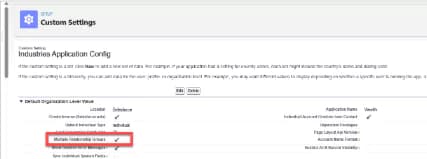
Financial Services Cloud comes with Multiple Relationship Groups enabled. This lets advisors add a person to more than one relationship group. For data security reasons some clients may want to disable this feature. Here’s how:
- From Setup, use the Quick Find box to go to Custom Settings.
- Next go to Industries Application Config, click Manage and Edit.