Integrating AWS S3 with Salesforce Data Cloud for Agentforce Agents

Kaushal SharmaKaushal Sharma

banner

To integrate AWS S3 with Salesforce Data Cloud for Agentforce, you connect the S3 bucket through Data Cloud's Amazon S3 connector, ingest your CSV file with a Data Stream, map it to a custom Data Model Object, and expose it to an agent through an autolaunched Flow action. The result is an Agentforce agent that answers customer questions using product data stored in your S3 bucket. Let's start with the following steps:

Create AWS S3 Bucket

  • Login your AWS Account

  • Search for Amazon S3 and click on this

  • Click on Create bucket

  • Enter the Bucket name. In my case bucket name is my-agentforce-bucket (Name must be unique)

  • To save click on Create bucket at the bottom

  • Go to inside bucket my-agentforce-bucket

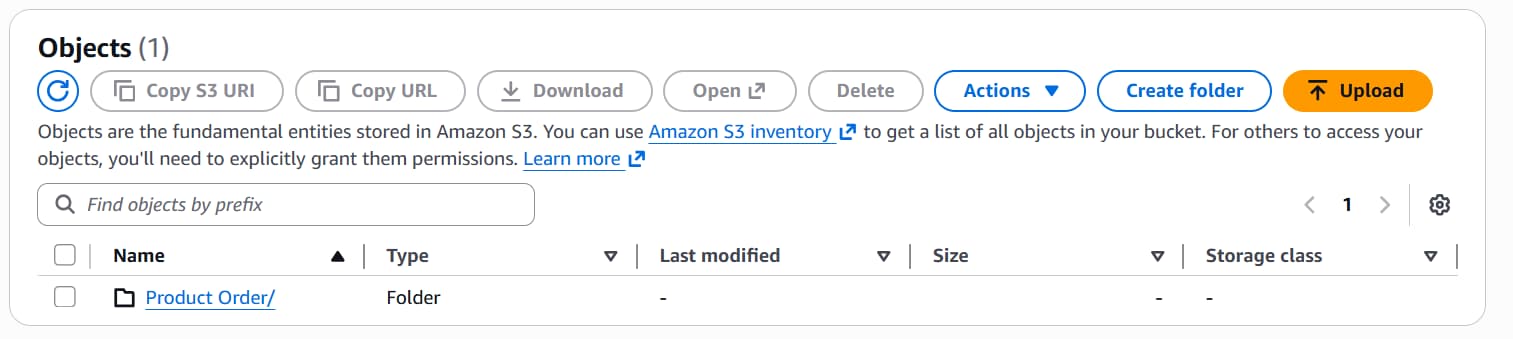
  • Click on Create folder and Give folder name Product Order/

  • Go to inside Product Order/ folder and Click on Upload and Select you your own csv file to upload. image1 image2 image3

  • After doing this. You have to create AWS access key and AWS secret access key to connect with salesforce

  • Click on your profile and go to Security credentials

  • Click on Create access key (Note: If you have already use that)

  • Select Third-party service option.

  • Click on Next

  • Now you will get access key. Copy the access key and keep it safe place.

Create Other Connectors

  • Go to Data Cloud Setup from Gear icon
  • Search for Other Connectors in Quick Find Box
  • Select Other Connectors and Click on New
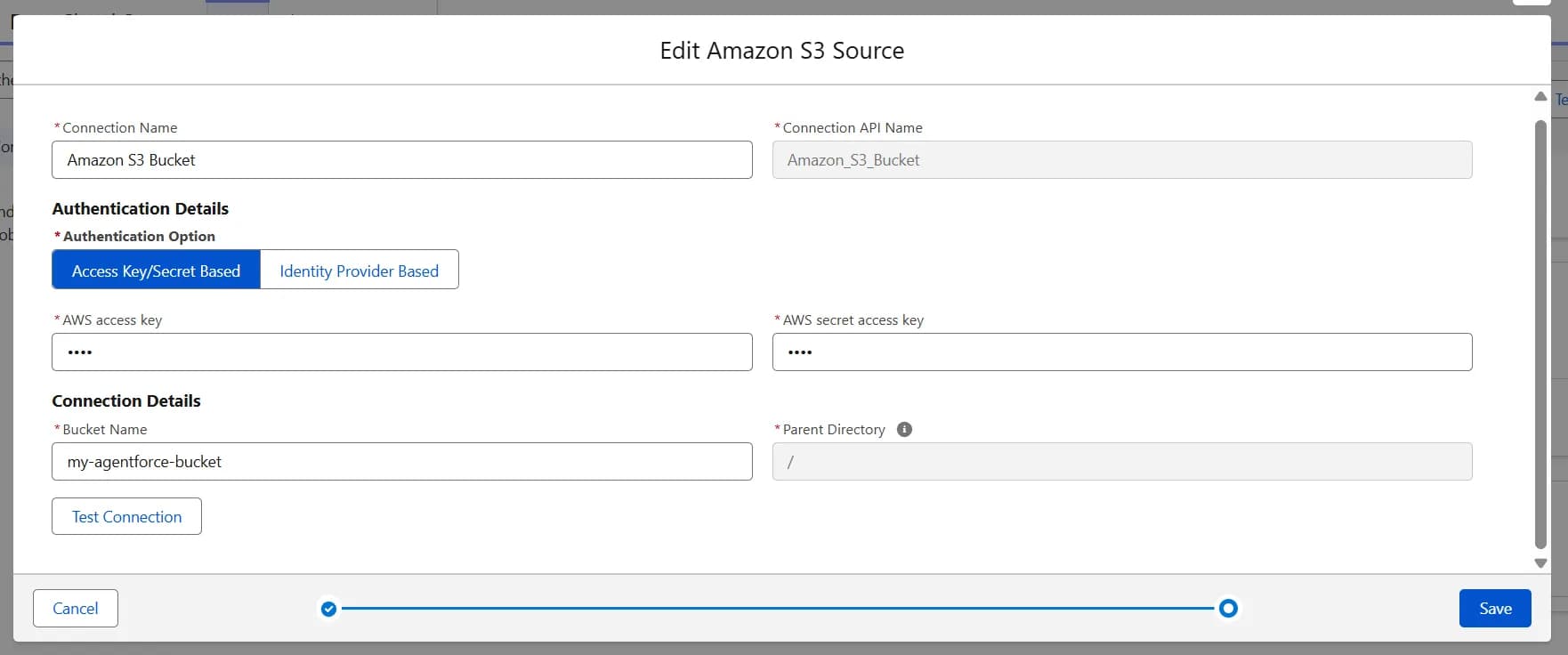
  • Select Amazon S3 connctor type
  • Enter inforamtion like below image image4
  • Before save click on Test Connection
  • Click on Save
  • Now its look like this: image5

Create Data Stream

  • Go to Data Stream tab in Data Cloud App
  • Click on New
  • Select Amazon S3 from Other Sources.
  • Click on Next
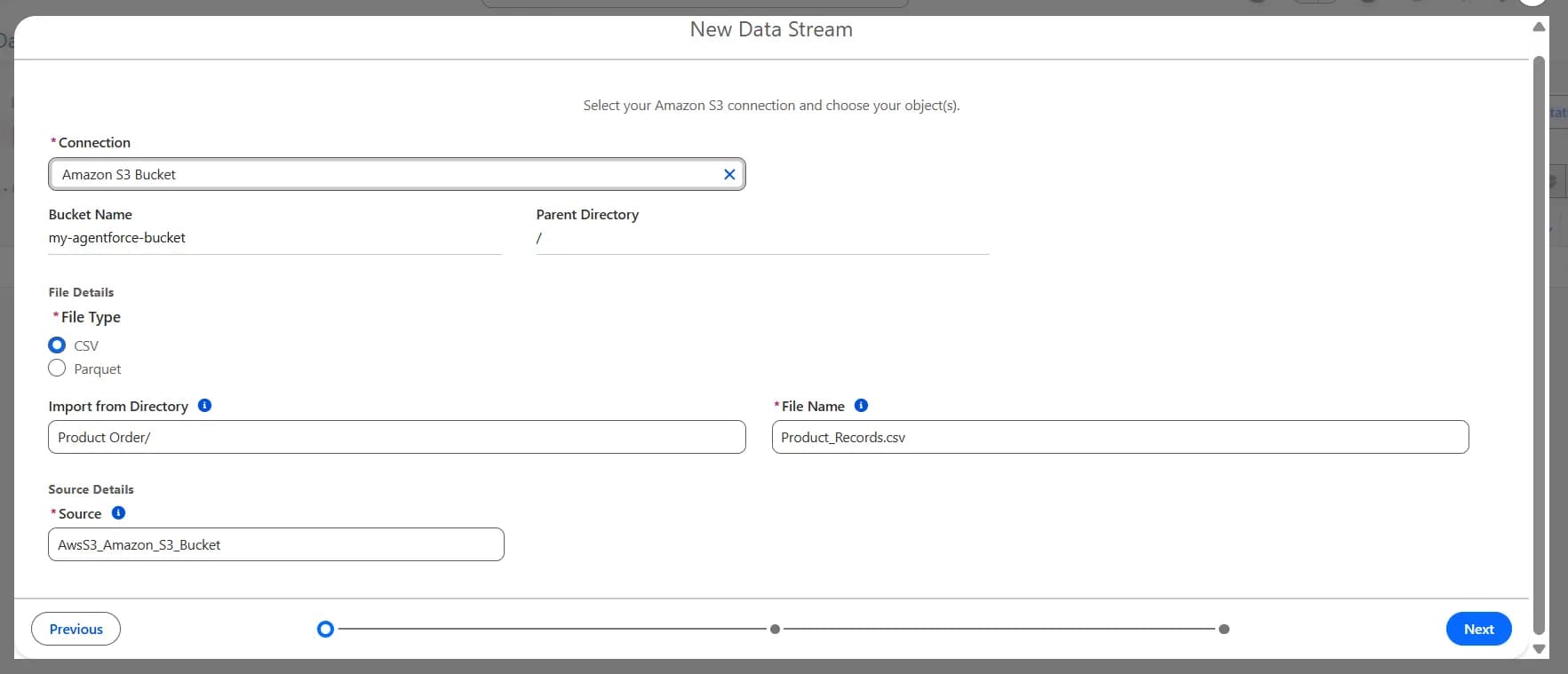
  • Enter the following detail as mentioned in image image6
  • Click on Next
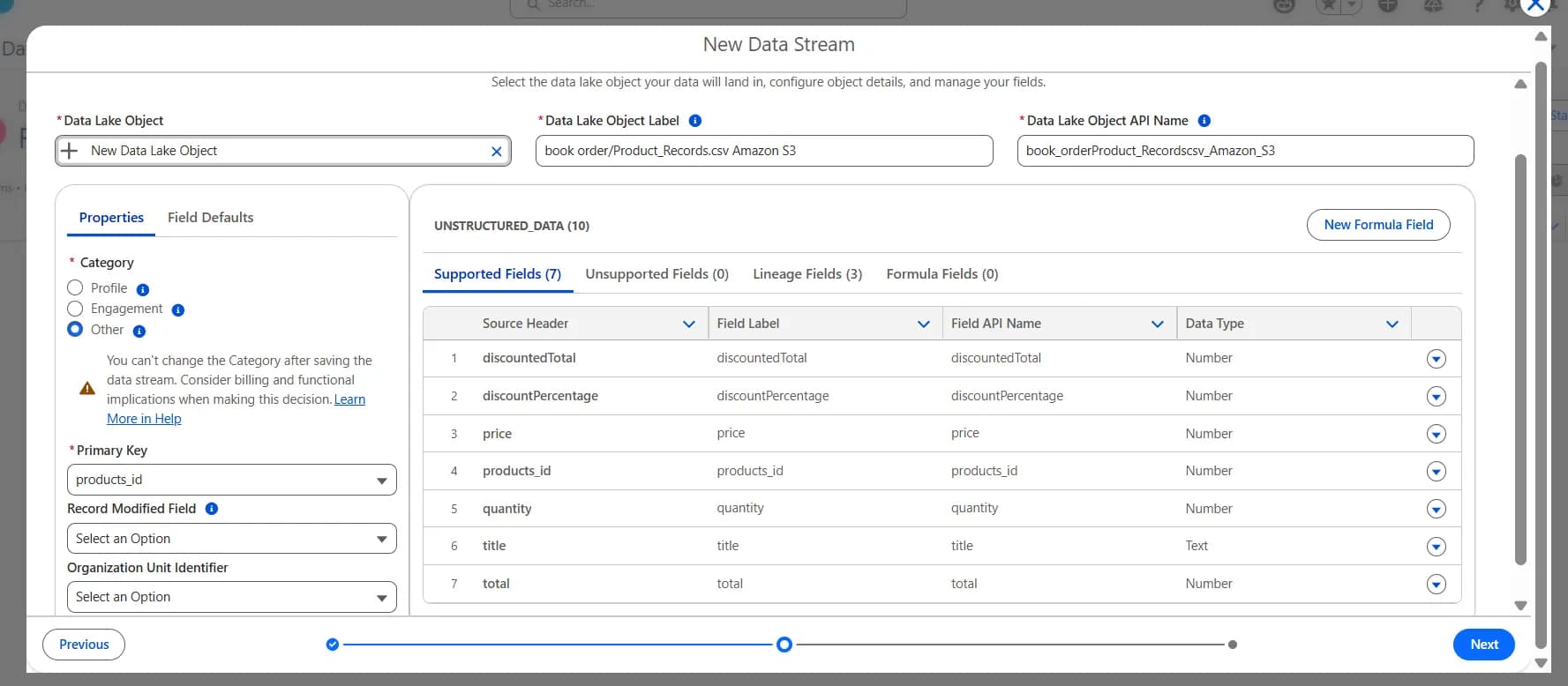
  • Click on Properties tab and select Other option
  • Select products_id as Primary Key
  • Click on Next
  • Enter the following details as mentioned in image image7
  • Click on Next
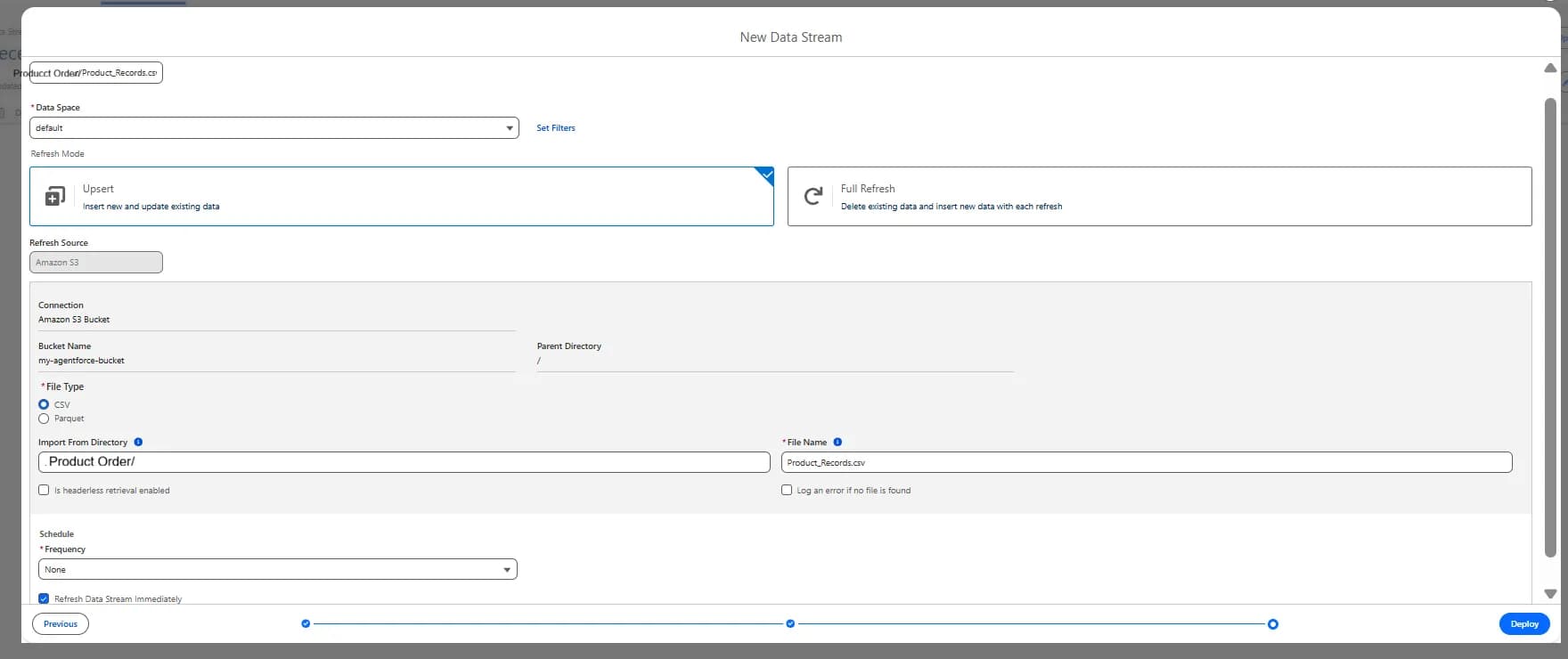
  • Entere the following details as mentioned in image image8
  • Click on Deploy
  • After Deploy Check that Last Run Status must be success image9
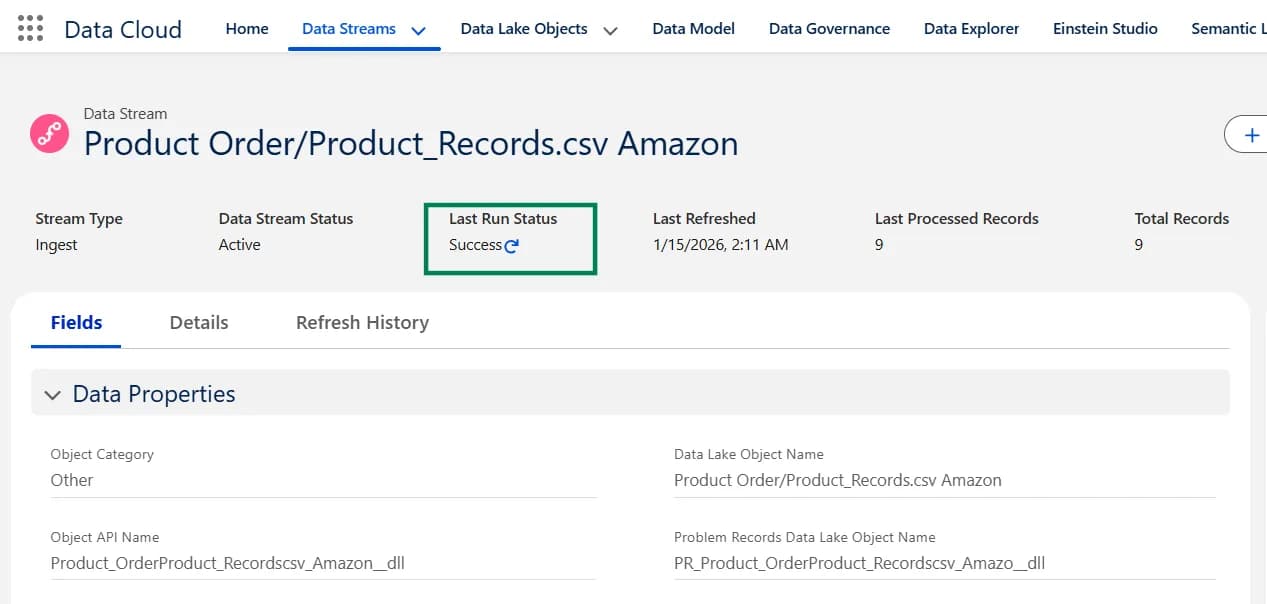
How Do You Check That the Data Lake Object (DLO) Was Created?

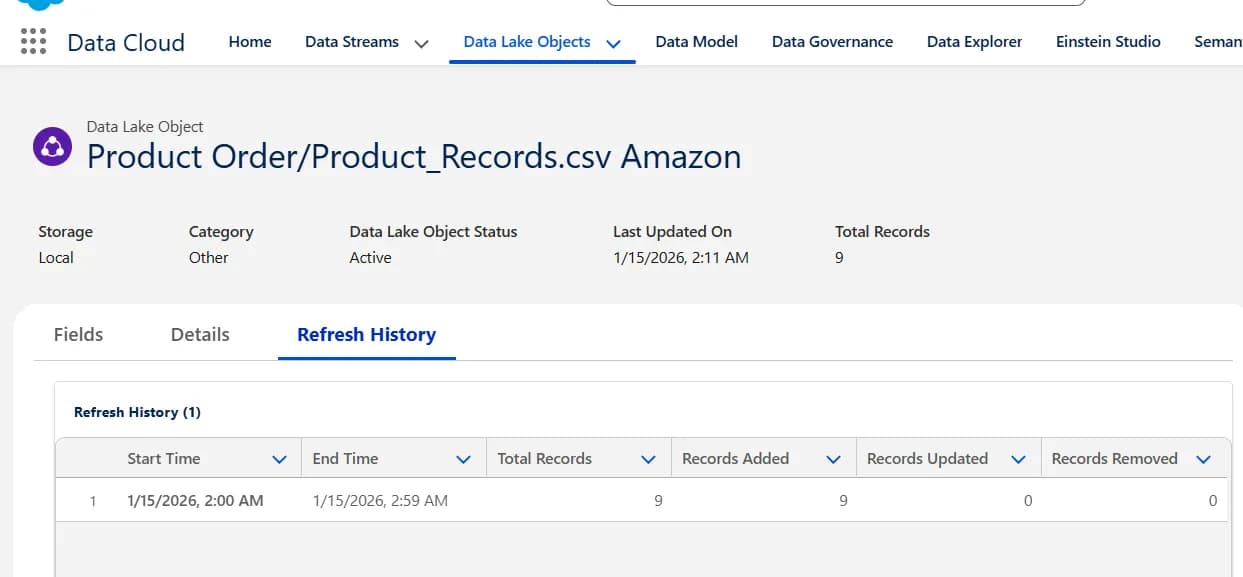
  • Go Data Lake Objects tab.
  • Select All Data Lake Object from list views
  • Click Product Order/Product_Records.csv Amazon from table. which is category is Other image10
Create Data Modal Object (DMO)

  • Click on Data Lake Objects tab
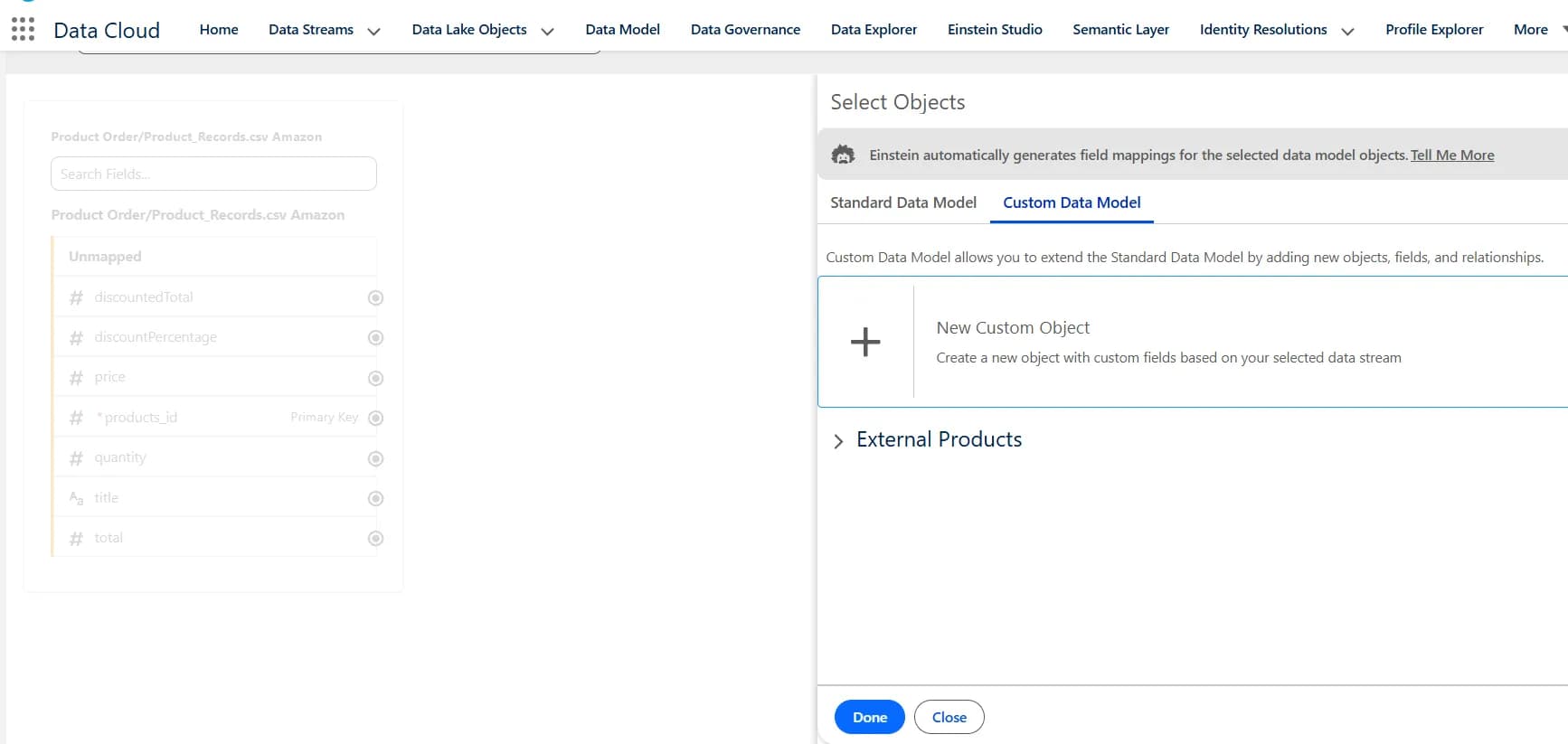
  • Click on Start button in the Data Mapping section on the right side.
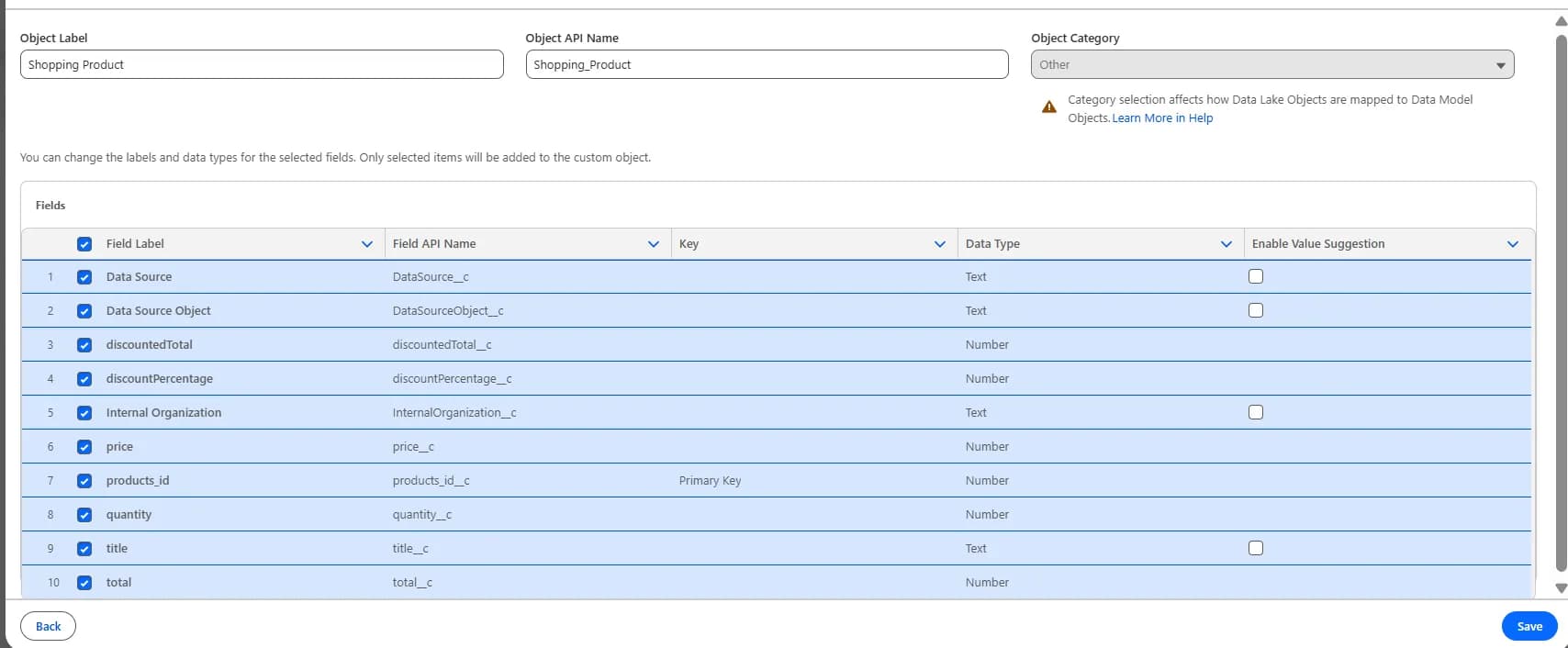
  • Click on Custom Data Modal tab and click on New Custom Object
  • Enter the Shopping Product in the Object Label field
  • Than its should like below as mentioned in image. image18
  • Object Label: Shopping Product
  • Object API Name: Shopping_Product image19
  • Click on Save
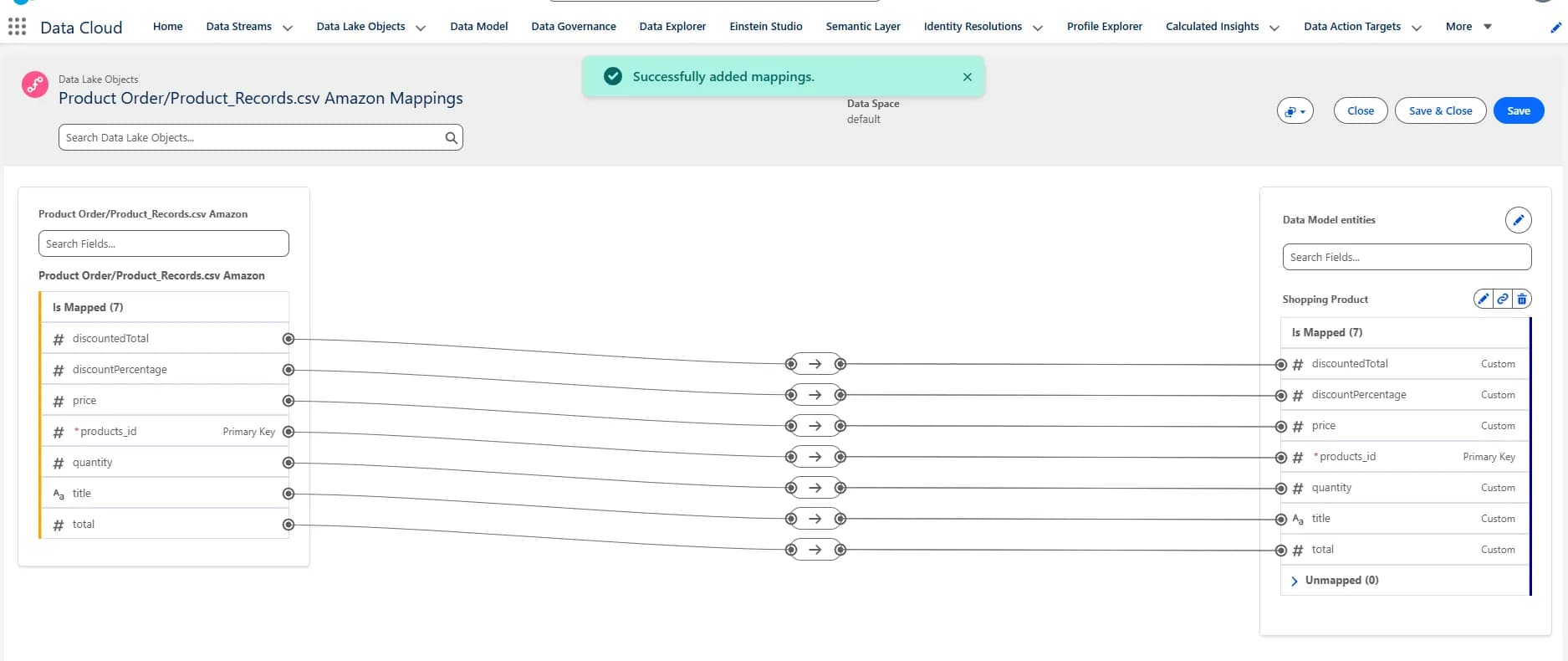
  • Now Mappling will look like this image11
  • Let's execute the SOQL query for Shopping Product object image12
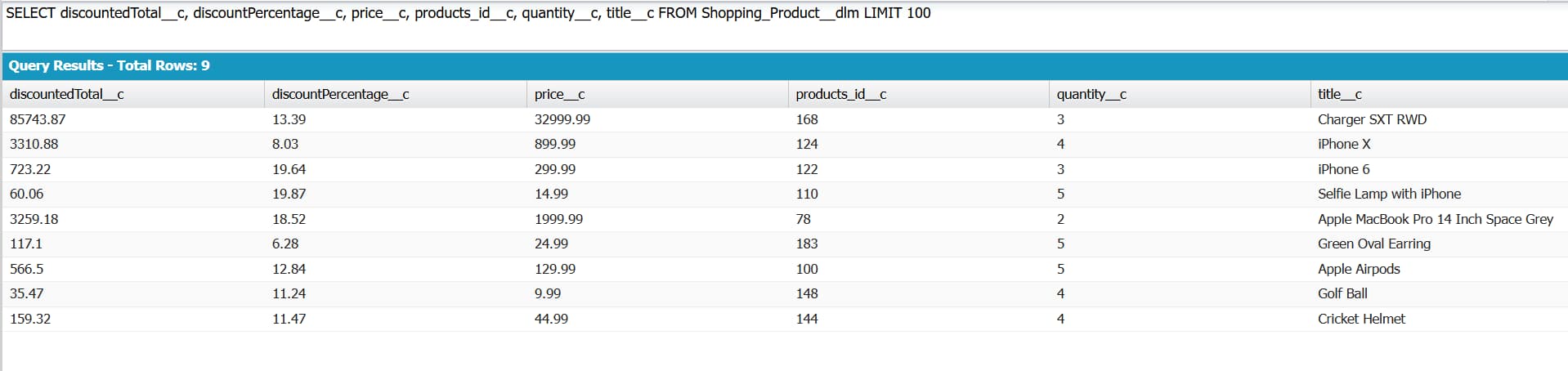
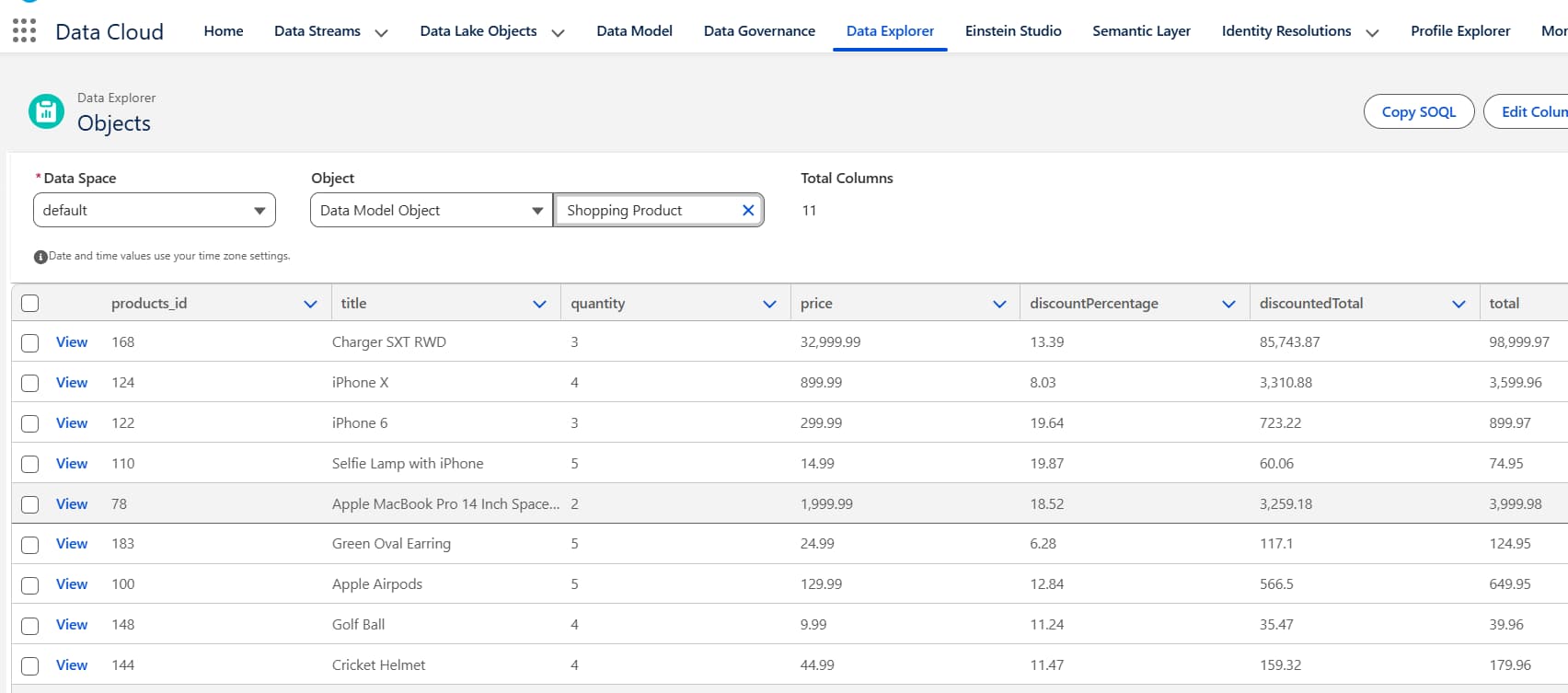
  • Go to the Data Explorer tab. From where you can see Shopping Product table image13
Create Flow to use in Agentforce

  • Go to setup and Search for Flow
  • Click on New Flow button and Select Autolaunched Flow (No Trigger)
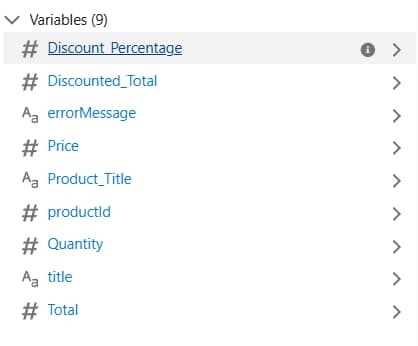
  • Create these below variable:(Make sure Availability Outside the Flow should be Available for input for productId and title. And apart from these 2 fields we have to make Available for output for others variable) image14 variable
  • Select Get element add Following details
    • Label: Get Product Items
    • API Name: Get_Product_Items
    • Data Source: Data Cloud Object
    • Data Space: default
    • Object: Shopping Product
    • In Filter Records - Condition Requirements:
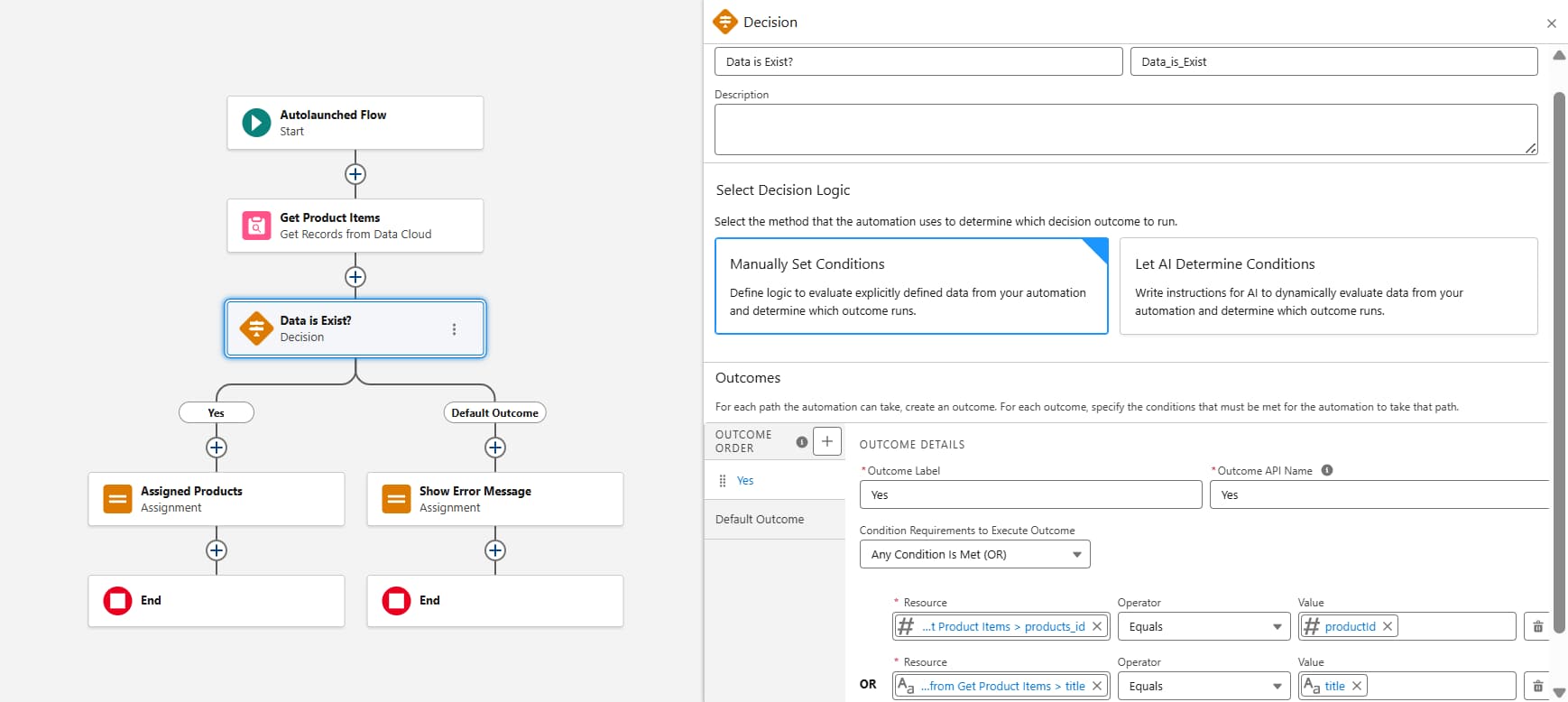
      • Field -> title Operator -> Equal Value -> title
      • Field -> products_id Operator -> Equal Value -> productId
  • How many Records to Store: Only the first record
  • How to Store Record Data: Automatically store all fields
  • Select Decision element and fill following details as mentioned in image. image15 decision flow
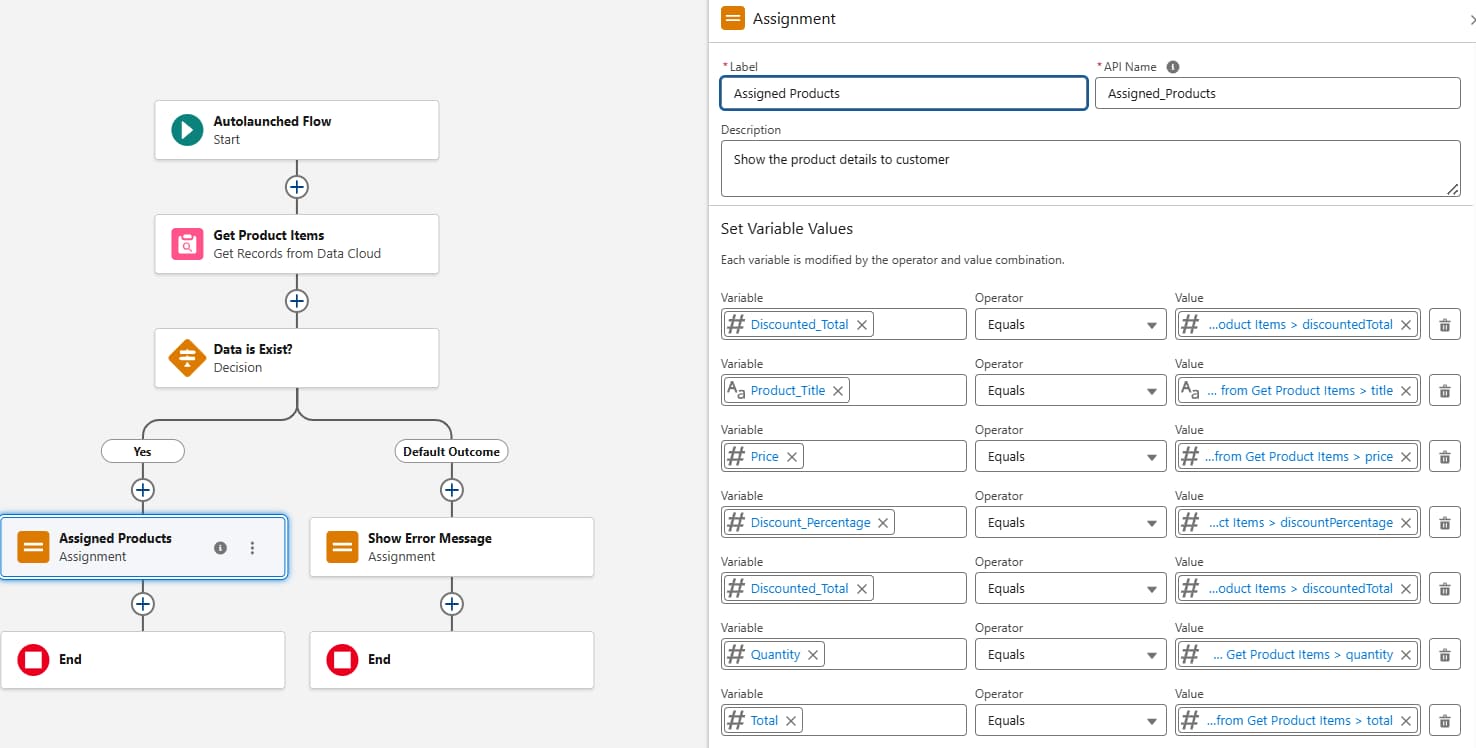
  • Select Assignment element for Assigned Products and fill following details as mentioned in image. image16 assignment flow
  • Select Assignment element for Show Error Message and fill following details as mentioned in image. image17 show error
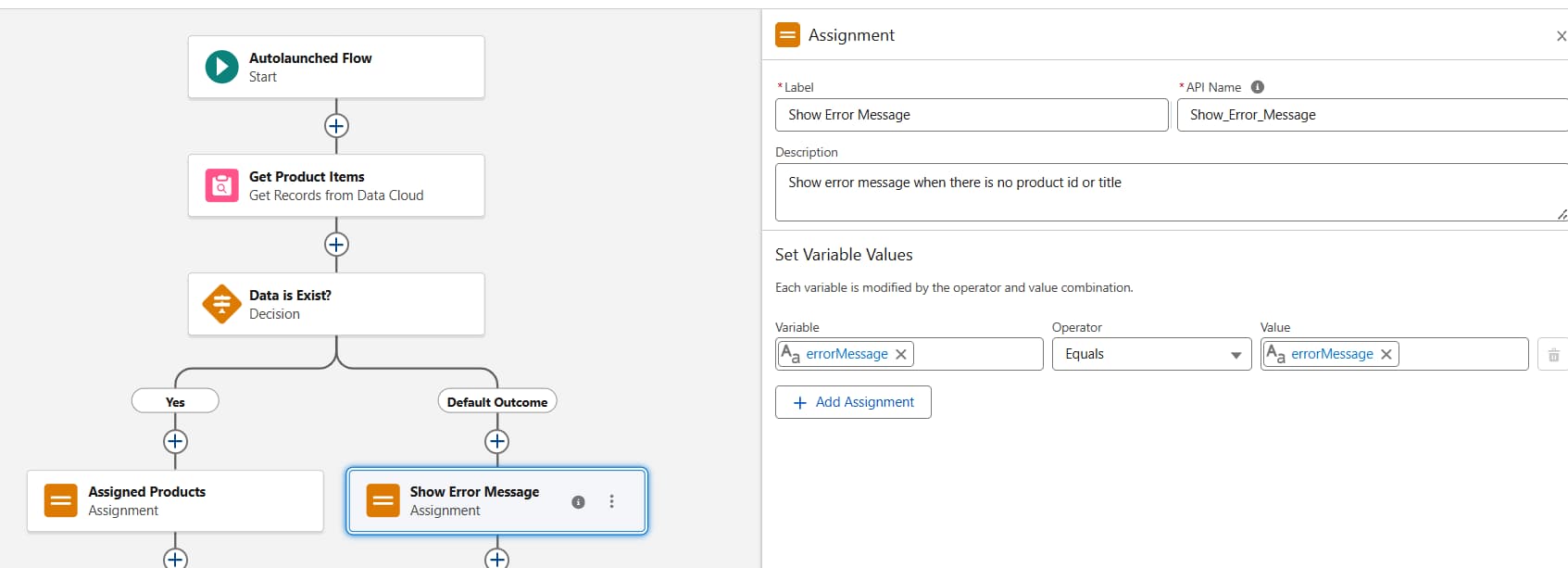
  • Click on Save and give name External Product Data Cloud Flow

Use Flow inside Agentforce

Free newsletter

Get Salesforce insights delivered weekly

Join 500+ Salesforce professionals and stay ahead of the curve.

No spam. Unsubscribe any time.

  • Go to setup and Searh for Agentforce Agents
  • Click on + New Agent
  • Select Create From a Template and than Agentforce Service Agent
  • Click on Next and Click on all Added to remove default topics
  • Give name Product Service Agent and API name Product_Service_Agent
  • Add about Company : This agent represents MyKart , a global technology company known for designing and delivering innovative consumer electronics, software, and digital services. Apple’s product portfolio includes iPhone, iPad, Mac computers, Apple Watch.
  • Select Agent user: EinsteinServiceAgent User (custom_service_agent@00dg5000002y0z3242345.ext) (This is in my case)
  • Click on Next and No need to select Data Library leave it is blank
  • Click on Create

Create Topic for Agentforce and Add Action

  • Go to setup and Searh for Agentforce Agents
  • Go to Product Service Agent CLick on menu button and CLick on Open in Builder
  • Click on #Topic and Click on New and CLick on + New Topic.
  • Name: Product Details Inquiry
  • Api Name: Product_Details_Inquiry
  • Classification Description: Handles customer inquiries to fetch product details based on their specific question.
  • Scope: You job is only to retrieve product details as requested by the customer, ensuring the response aligns with their query, and not to address unrelated topics or perform actions outside this scope.
  • Instruction 1: If the customer provides a product title or product id, use it to fetch the relevant details.
  • Instruction 2: Provide concise and accurate product details based on the customer's request.
  • Instruction 3: If the customer provide a product id or product title than you have to show about product based on customer request.
  • Instruction 4: If customer ask for specific things like product title, price, discount percentage, discounted total, total and quantity than only show specific things.. If the customer ask for product details than show all details to a customer.
  • Click on Next and Select the actions External Product Data Cloud Flow
  • Click on Finish

Let's see quick demo

Frequently Asked Questions

How does Salesforce Data Cloud connect to an AWS S3 bucket?

Through the Amazon S3 connector under Other Connectors in Data Cloud Setup. You supply the AWS access key and secret access key created in your AWS Security credentials, and you can run Test Connection before saving to confirm the link works.

How does an Agentforce agent access data stored in AWS S3?

The agent does not read S3 directly. A Data Stream ingests the S3 CSV into a Data Lake Object, which is mapped to a custom Data Model Object (Shopping Product in this guide). An autolaunched Flow queries that object with a Get element, and the Flow is added to the agent as a topic action.

What file format and key does this integration use?

The walkthrough uploads a CSV file into a folder in the S3 bucket, and the Data Stream uses products_id as the primary key. The Flow then filters records by product id or title to answer customer questions.

Do you need to write code to build this integration?

No. Every step in this walkthrough is configuration: the S3 connector, the Data Stream, the DLO-to-DMO mapping, the autolaunched Flow, and the agent topic are all built with point-and-click tools.


Want to implement this for your organisation? Phenoble's Data Cloud integration services cover the full pipeline, from S3 ingestion and identity resolution to Agentforce agent grounding. Our team has connected Data Cloud to AWS, Azure, and on-premise systems for enterprise clients. Get a free architecture review →

Get a Free Consultation